Meet the system
A complete writing workflow that keeps you in control from first idea to final book.
Finish the book you keep starting
The Story Production System helps you plan, draft, edit, market, and publish in one guided flow. You make the creative decisions. The system handles the structure, continuity, and output.
- Guided interview creates your outline, characters, and style guide
- Draft one chapter or one scene at a time, you control the pace
- Say "save my work" or "quick save" anytime, prompts to save when moving between chapters
- AI editors, marketing kit, and print ready export built in
Writing a book should not require six tools and a dozen tabs
Most writers lose momentum because the workflow breaks down. This system removes the friction by keeping your plan, prose, feedback, and marketing in one place.
Fragmented tools
Outlines in one app, drafts in another, notes somewhere else. Context gets lost and progress stalls.
Generic AI output
Prompts alone are not enough. Without structure, continuity, and voice rules, drafts feel flat.
Feedback chaos
Editing is expensive and slow. Most AI tools give unstructured feedback you cannot trust.
See the workflow
This is one continuous flow. Every phase uses the same project files and the same memory.
Five phases, one shared memory
You give the signal. The system does the work, then stops so you can review before moving on.
Start a new book
Say "start a new book" and answer a short interview. The system builds your outline, character file, notes, plot summary, prompt, and style guide.
Can I give it details about my story?
Yes. The interview asks two to three questions at a time and captures your logline, beats, tone, characters, and formatting preferences.
Can I set word counts?
Yes. You set a target word count and planned chapters. The system uses reading level bands to keep chapters in range, for example a grade 9 to 11 reading level targets about 2,300 words per chapter.
Can I target a specific age group?
Yes. You set a reading level during setup, and the system enforces it throughout drafting and editing. Whether you are writing for middle grade readers or adults, the vocabulary, sentence complexity, and content stay appropriate for your audience.
Draft chapter one
Say "draft chapter one" and the system writes from your outline. Work by chapter or by scene, then review before moving on.
Do I have to tell it to draft the next chapter?
Yes. It never auto advances. You choose the next chapter or scene when you are ready. When you say "next chapter" or "I'm done with this chapter," the system asks if you want to save your progress first.
How do I save my work?
Just say "save my work" and the system will save your changes. Say "quick save" for an instant save without prompts. To back up to the cloud, say "sync" after saving. The system also prompts you to save whenever you move between chapters.
Will chapters need rewriting? What about AI memory problems?
Here is the honest answer: most AI tools forget what your story is about. They lose track of your outline, your characters, your world rules. By chapter five, they are writing a different book.
This system solves that by feeding the AI your outline, character file, notes, and style guide before every chapter. It tracks continuity across drafts, flags contradictions, and never invents details that conflict with what you established. You still review and revise, but you are not starting from scratch each time.
How does it avoid sounding like AI?
The system blocks common AI-isms before they reach your draft. It maintains lists of overused phrases, generic descriptions, and words that signal machine writing. It also catches broken-record repetition, where the AI says the same thing three times in a row with slightly different words. That pattern frustrates authors using ChatGPT or Claude directly, and this system is built to prevent it.
It also enforces your style rules, like no em dashes, specific punctuation preferences, and vocabulary restrictions you define. The result is prose that sounds like you wrote it, not like a chatbot did.
Send to editors
When your draft is complete, say "send to editors" and a full team reviews structure, prose, continuity, and sensitivity.
Can I wait until the whole book is done before editors?
Yes. Editing only starts when you say so. The system will not begin edits until you trigger it.
How do I review the suggestions?
Each editor creates a report with specific suggestions tied to locations in your manuscript. When you are ready, you say something like "I want to work on the report by the line editor and start with issue number 1." The system walks you through each suggestion, and you accept or reject it. Nothing changes in your draft until you approve it.
Can I ask an editor why they suggested something?
Yes. You can enter discussion mode with any editor. They explain their reasoning, answer your questions, and offer alternatives if you push back. It is like having a real conversation about your work.
Start marketing
Generate blurbs, keywords, ad copy, and social content that are based on your actual book, not generic templates.
Publish
Package your book into a print ready Word document with the right front matter and formatting.
Build trust with proof
Real files, real outputs, and clear control over every change.
See what the system produces
Every phase writes tangible files you can open, review, and own. Nothing is hidden behind a chat box.
Project files
Outline, characters, notes, and prompt files keep your intent clear and consistent.
Chapter drafts
Each chapter or scene is its own file, so you always know what changed and when.
Reports and kits
Editor reports and marketing kits are structured documents you can act on immediately.
Sample chapter excerpt
She had the outline on her desk, but the hallway still felt too quiet. The system had already named the scenes, so all she had to do was step into the moment and write. By the time the kettle clicked off, the chapter had a beginning, a turn, and a reason to keep reading.
Sample marketing copy
A small town secret. A voice she cannot ignore. One chance to finish what her family started. This is a slow burn mystery about courage, memory, and the cost of unfinished stories.
What authors say
"I finished my first draft in six weeks. The system remembered details I had forgotten, and the editing team caught problems I would have missed for months."
"I was skeptical about AI writing, but this is different. It does not write for me. It keeps me organized and moving forward. I have three books out now."
"The marketing kit alone saved me hours. Keywords, blurbs, ad copy, all based on my actual book. I just had to review and tweak."
Your AI editing team
When you say "send to editors," the system sends your full manuscript to a team of AI editors built into the framework. Each one reads the entire book, reviews reports from editors before them, and creates a structured list of suggestions. You see every proposed change and decide what to accept.
Developmental
Structure, plot, pacing, character arcs
Line editor
Prose, voice, word choice, rhythm
Continuity
Timeline, facts, world rules
Sensitivity
Cultural awareness, representation
Proofreader
Grammar, typos, final polish
Marketing
Market positioning, tropes
Built in protection
Features that keep your work safe and your process stable.
Save on command
Say "save my work" or "quick save" to save your changes. When you move to the next chapter, the system prompts you to save first.
Cloud backups
Say "sync" to back up your work to the cloud. Recover old versions and never lose a chapter.
Custom rules
Teach the system your preferences. Rules persist across drafting and editing.
Discussion mode
Talk to any editor about feedback and get clear reasoning before you accept changes.
Import existing work
Bring in manuscripts from elsewhere and organize chapters without rewriting your prose.
No surprise changes
The system never saves over your work or sends anything without asking first. You approve every action before it happens.
Straight answers to the common concerns
"How does my idea become an actual book?"
You start with whatever you have, even just a rough idea. The system asks you two or three questions at a time about your story, characters, tone, and stakes. By the end of the interview, it has built your outline, character file, plot summary, and style guide. You go from a loose concept to a structured project ready for drafting.
"AI writing sounds generic."
Most AI tools produce flat, forgettable prose because they have no memory. They repeat phrases, lose track of characters, and drift from the tone you wanted. This system feeds the AI your outline, characters, world rules, and style guide before every chapter. It also blocks overused phrases and flags continuity drift, so your voice stays consistent from chapter one to the end.
"This looks too technical."
You use plain English. The system does the file work in the background, so you never have to manage folders or scripts.
"I do not trust AI with my work."
Nothing changes without your approval. Every edit is a suggestion, and you see exactly what will change before you accept it.
"What about series? Will it forget my characters by book three?"
Each book in a series shares the same character files, world rules, and continuity notes. When you start book two, the system already knows who your characters are, how they talk, and what happened before. It does not reinvent them. It builds on what you established and flags anything that contradicts earlier books.
"Is it worth the price?"
One system replaces planning tools, drafting support, editor feedback, and marketing services that cost far more when purchased separately.
Start writing
Pick the plan that fits how you work. Both give you the full system.
Charter round · 20 seats left
One system, two ways to pay
Charter members get the full workflow at Charter pricing. No hidden tiers, no feature gating.
Charter Member
- Full planning, drafting, editing, and marketing workflow
- Automatic backups and version history
- Print-ready book packaging from inside the editor
- Audio narration from inside the editor
- Author copy requests from inside the editor
One-time license
- Full planning, drafting, editing, and marketing workflow
- Automatic backups and version history
- Does not include packaging, narration, or author copies
Join as Charter
20 Charter seats left. Go to onboarding to create your account and start your first project.
Latest release: v0.1.5-39
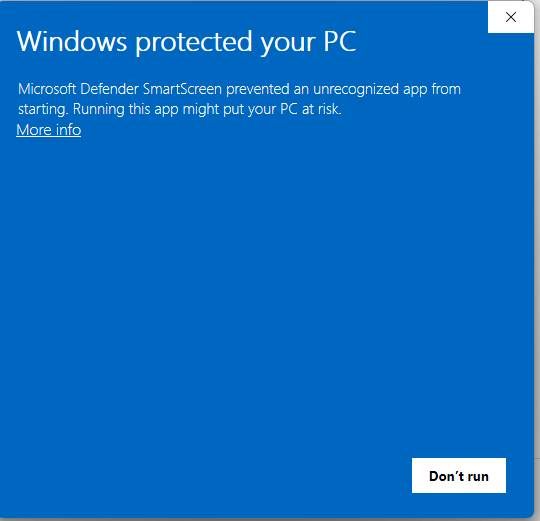
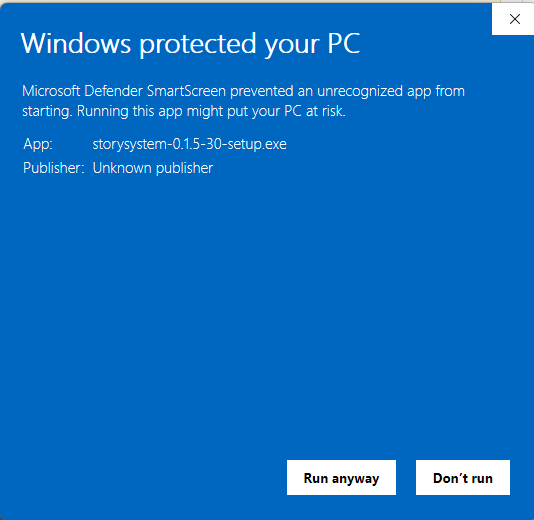
Your system may show a security warning
When you run the installer or app, your system may block it because the app is new. This is normal for small software publishers. The app is safe and signed by Story Production System.